Teach: A Vibrant Display Font for Digital Sellers
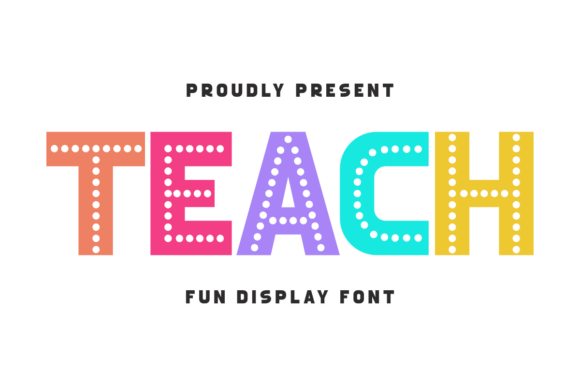
As a digital product creator with years of experience in online selling, I always look for design assets that add value to my offerings without complicating the process. Teach is a fun, vibrant, and playful display font that immediately caught my attention. Its dotted letterforms and cheerful colors make it ideal for back-to-school themes, classroom decor, and any project aiming to evoke a sense of joy and energy.
The Mood and Niche Appeal of Teach
Teach has a distinct visual personality that leans into playfulness and whimsy. It feels more like a hand-drawn illustration than a traditional font, which makes it perfect for niche audiences looking for something unique. The font’s charm appeals to educators, parents, and small business owners who want to create printable designs, social media graphics, or merchandise that stands out.
It doesn’t feel overly decorative or complex, which means it can work in a variety of contexts. Whether you're designing a greeting card, a t-shirt graphic, or a Canva template, Teach adds a friendly and energetic touch without overwhelming the overall composition.
Real-World Applications for Teach
One of the strengths of Teach is its versatility across different product types. As a digital product creator, I’ve tested it on SVG designs, PNGs, clipart bundles, and sublimation graphics. It works especially well for sticker designs, planner pages, and printable wall art where a bold and colorful presence is needed.
For print-on-demand sellers, Teach can be used in t-shirt designs, mug prints, and tote bag graphics. Its bright colors and clear letterforms ensure that it remains legible even when scaled down. When paired with a complementary serif or sans-serif font, it creates a balanced visual hierarchy that enhances the overall appeal of a design bundle.
It also shines in social media templates and blog graphics, where eye-catching typography can help increase engagement. For Canva template sellers, Teach can be a standout element in a collection of educational or seasonal designs.
How Teach Enhances Product Presentation
When preparing a new product collection for Etsy or a creative marketplace, the visual appeal of your listings is crucial. Teach can be a valuable tool in creating mockup previews that catch the eye. Its lively style helps differentiate your products from others, making them more likely to stand out in search results.
For thumbnail appeal, Teach adds a sense of personality that can improve click-through rates. It also supports brand consistency when used across multiple products, helping to build a cohesive identity for your shop. Whether you're creating a seasonal bundle or a digital paper pack, Teach contributes to a more professional-looking product lineup.
Where Teach Works Best
Teach excels in large product previews, themed bundles, and decorative layouts. It’s ideal for printable products such as nursery prints, classroom posters, and holiday cards. Its vibrant nature makes it a strong choice for merchandise graphics, social media promos, and product mockups that require a bold visual impact.
As a digital download, Teach can be part of a design bundle that includes other display fonts, illustrations, or templates. It also fits well in creative marketplace listings where visual storytelling plays a key role in attracting buyers.
Where to Use Teach Carefully
While Teach is a great asset, it may not be suitable for every use case. In tiny sticker details or overly complex layouts, the font’s dotted style can become distracting or hard to read. For low-resolution print products, the font’s intricate elements might not translate well, leading to a loss of clarity.
On dark backgrounds, the font’s bright colors may not contrast well, reducing its effectiveness. Similarly, in text-heavy templates or projects requiring clean cutting lines for Cricut or Silhouette machines, Teach may not be the best choice due to its decorative nature.
Practical Seller Notes
Before publishing any product featuring Teach, I recommend testing it on real mockups. Preview it as a marketplace thumbnail to see how it looks at smaller sizes. Check how it appears on both white and dark backgrounds, and test print colors to ensure they match your expectations.
If you’re using Teach in SVG or PNG formats, verify the transparency and file resolution. For Cricut or Silhouette projects, inspect the cut quality to ensure the font’s details don’t interfere with the final output. Organize your files clearly for customers, and consider pairing Teach with other fonts to create a more dynamic design set.
Finally, always confirm the commercial license before selling finished products. Make sure the asset allows for use in digital downloads, print-on-demand, and other commercial applications. This ensures that your products remain compliant and avoid potential legal issues.
Conclusion
Teach is a versatile and engaging display font that can enhance a wide range of digital products. Its playful style makes it ideal for back-to-school themes, classroom decor, and creative projects that benefit from a cheerful aesthetic. By testing it across different product types and considering its limitations, you can effectively integrate it into your online shop and boost the visual appeal of your offerings.